Save from the app you are already using
Send a page to Later Bucket from the iOS Share Sheet, or paste any copied link. Articles, videos, maps, recipes, and social posts all land in one calm place.
A bookmark manager for iPhone
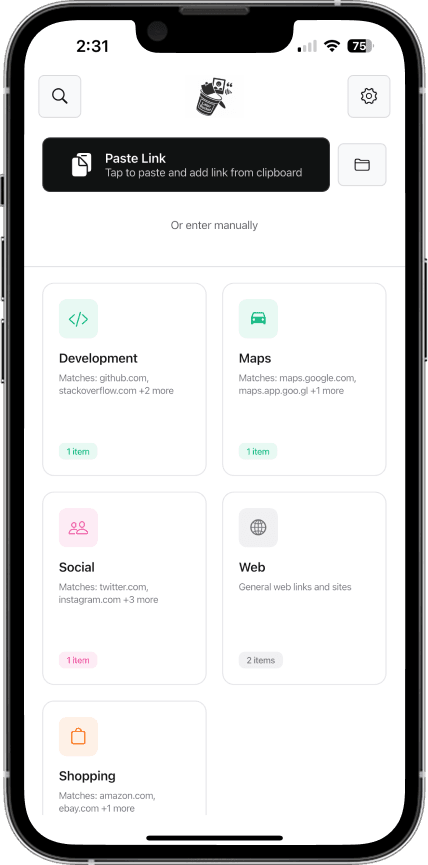
Later Bucket saves articles, videos, maps, and social posts from any iPhone app—then automatically sorts them into categories you create.
Free to start · No account required
Share SheetSave from other apps
Smart rulesSort links automatically
On-deviceYour links stay private
Your links, under control
Browser tabs are temporary. Notes become cluttered. Later Bucket is built specifically for collecting links without breaking your flow.
Send a page to Later Bucket from the iOS Share Sheet, or paste any copied link. Articles, videos, maps, recipes, and social posts all land in one calm place.
Create categories with keyword and URL rules. New links are filed automatically, while manual categories keep you in control when you need them.
Filter your saved links by category, source, or type. Your collection stays easy to scan instead of disappearing into browser tabs or a notes dump.
A three-second habit
When something is worth keeping, send it to Later Bucket from the iOS Share Sheet. Your rules handle the filing, so the link is ready when you actually have time for it.
An article, video, map, recipe, or post.
Save without leaving the app you are using.
Browse by the category, source, or type you need.
Made for curious people
Keep research, references, and useful explainers together.
Collect inspiration, locations, products, and source material.
Save the thing now without interrupting what you are doing.
Private by design
Later Bucket does not upload your saved links, categories, or notes to its servers. You keep control of the collection you build.
Read the privacy policyQuestions, answered
Any link you can copy or share, including articles, websites, videos, maps, recipes, products, and social media posts.
You create simple rules using keywords or URL patterns. When a saved link matches a rule, Later Bucket places it in the right category automatically.
Your saved links, categories, notes, and organization preferences stay on your device. Later Bucket does not upload your saved content to its servers.
Later Bucket is designed for iPhone and currently requires iOS 17.6 or later.

Make room for later